BlueRide logo

Appointments

A teacher meeting booked in two taps, with zero phone tag.

Parent meetings booked without a single phone call

Key benefits

  • Self-serve booking
  • No scheduling back-and-forth
  • Fewer missed meetings
  • Organized teacher calendars
  • Better parent-teacher contact

How it works

Four steps, built around how it's actually used

  1. Teachers publish open slots

    A teacher opens a few slots on their own calendar inside BlueRide — no separate sign-up sheet on a classroom door.

  2. Parents book directly

    A parent picks an open slot and books it from their phone — no call to the office to check what's free.

  3. Both sides get a reminder

    Parent and teacher both get a reminder before the meeting, so a booked slot doesn't quietly get forgotten.

  4. One calendar for the whole school

    The office sees every booked slot, across every teacher, in one place — not scattered across individual notebooks.

What actually changes

BlueRide vs. the way it's usually done

The usual way — The sign-up sheet on the door

Open slots live on a paper sheet taped to a classroom door, or get traded over a string of phone calls trying to catch a free moment.

For the school

No more scattered sign-up sheets

The office sees every booked meeting across the whole school in one place, instead of chasing a dozen separate sign-up sheets.

For staff

Slots that fill themselves

A teacher opens a few slots on their own calendar and lets parents book directly — no sign-up sheet to print, post, or collect.

For parents

Booked in two taps

Parents pick an open slot and book it directly from their phone, with a reminder before it arrives — no phone tag.

Inside the product

What it actually looks like

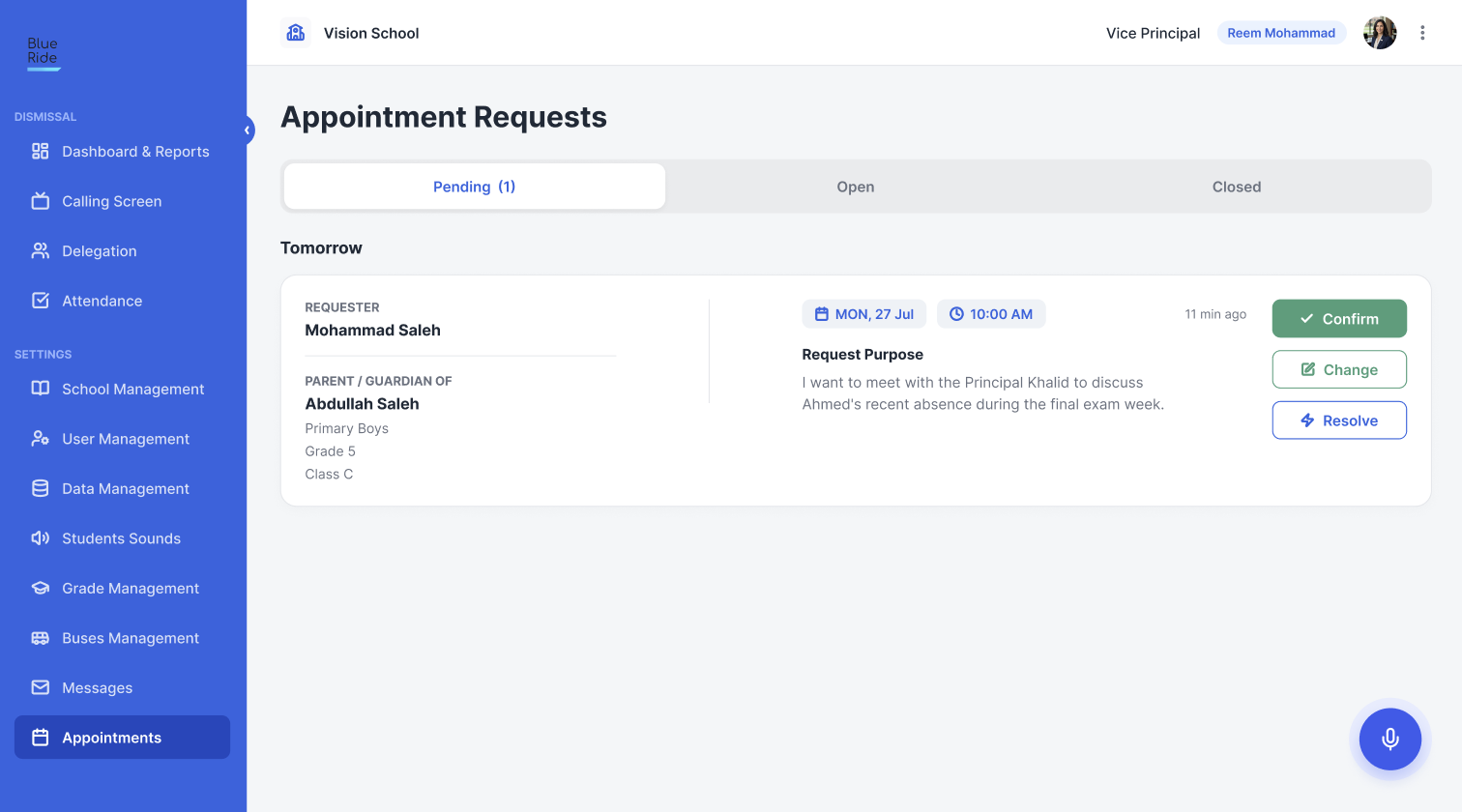
The BlueRide school-admin “Appointment Requests” screen: Pending / Open / Closed tabs, a parent's request (Mohammad Saleh, guardian of Abdullah Saleh, Grade 5) for Mon 27 Jul at 10:00 AM with the stated purpose, and Confirm / Change / Resolve actions.
Every parent meeting request in one queue — see the purpose, then confirm, reschedule or resolve in a click.
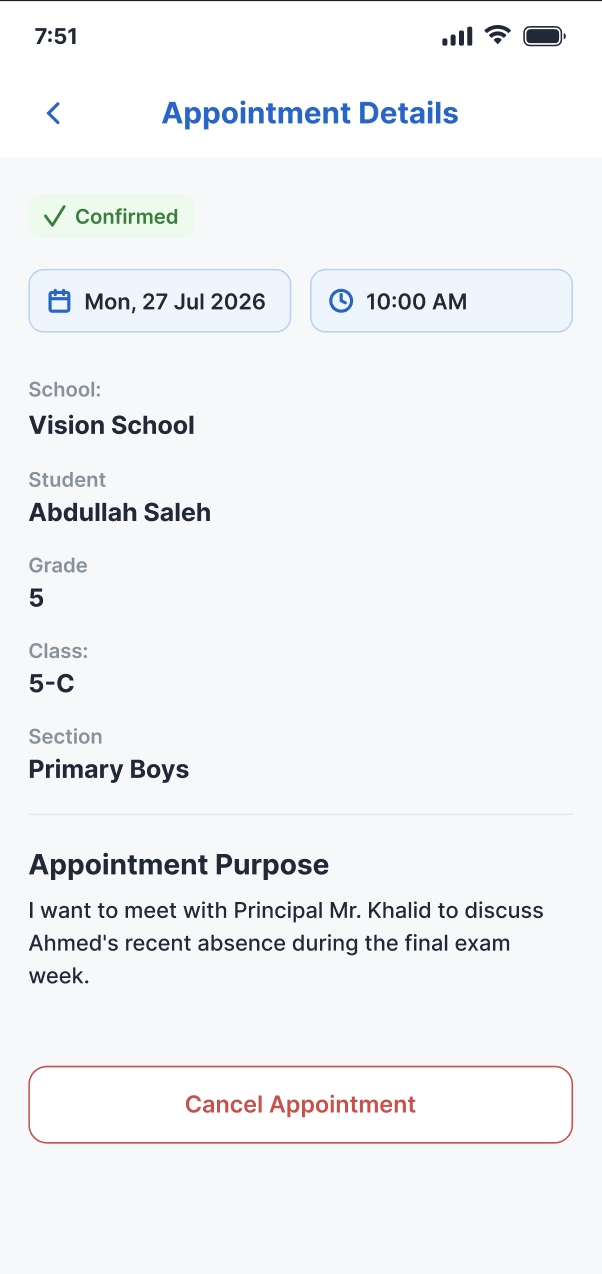
The BlueRide parent app on a phone, an “Appointment Details” screen marked Confirmed: a meeting at Vision School on Mon 27 Jul 2026 at 10:00 AM for student Abdullah Saleh (Grade 5, Primary Boys), the appointment purpose, and a Cancel Appointment button.
What the parent sees once it's booked — the confirmed time, place and purpose, with a tap to cancel if plans change.

Two views, one system

What the office sees. What parents see.

The school office

Every teacher's calendar, in one place

See every booked meeting across the whole school, instead of chasing a dozen separate sign-up sheets.

Parents

Book a slot, not a phone-tag marathon

Pick an open slot on the teacher's calendar and book it directly, with a reminder before it arrives.

Straight from users

Trusted by parents and school staff

  • Parent

    I thank you for this outstanding application — it is truly exceptional. I believe it would be a major improvement if it were implemented across all schools. The greatest benefit would be better organization outside schools, reducing both traffic congestion and the crowding at school gates during student pickup.

    Fahd Ali Ibrahim

    Father of two students at Al-Andalus Private Schools

  • School staff

    The BlueRide application is one of the best practical applications — it has successfully made the student dismissal process safe and efficient. Thank you for your professionalism and for always helping resolve the issues we occasionally encounter.

    Fatimah Al-Qahtani

    Elementary Section Supervisor

  • School staff

    Honestly, the app is excellent. We used it last year, and it organized the dismissal process, reduced congestion, and — most importantly — improved safety. Thank you for bringing it back. 🤍👍

    Ahmed Al-Zahrani

    Al Waqar School

  • Parent

    I was a user of the BlueRide program last year, and it made picking up my daughters from school very easy and convenient. I thank the company behind the program — it is one of the best examples of using modern technology to improve communication and coordination with students.

    A BlueRide parent

Common questions

Questions people actually ask before deciding

How do I know when a teacher has an open slot?

Teachers publish their own open slots inside BlueRide, and parents pick and book one directly — no need to call and ask what's free.

Will I forget a meeting I booked?

Both the parent and the teacher get a reminder before the meeting, so a booked slot doesn't quietly get missed.

Can the office see every meeting booked across the school?

Yes — every booked slot, across every teacher, shows up in one place for the office.

Can I reschedule or cancel a booked meeting?

That's a good one to walk through directly — email info@blueride.co and we'll cover how changes work.

One more question?

Talk to our AI assistant

Ask about anything on this page out loud, right now — instant answers, no hold music.

Talk to our AI

You'll talk to BlueRide's AI assistant — not a person. It answers questions about the platform in real time. The conversation is transcribed and saved with your contact details for our team to review.

Explore the platform

More from BlueRide

Everything your school runs through the day — in one system.

Ready to start

Open your own teachers' calendars to parents.

Book a live 20-minute demo with our team, or send us your school's numbers and we'll put together a detailed quote.