BlueRide logo

Messaging

One inbox for every school announcement and every teacher's note — nothing lost in a group chat.

Direct messages between the school office and the family

Key benefits

  • Multilingual — English & Arabic
  • Automatic absence alerts to parents
  • No messy WhatsApp groups
  • Phone numbers stay private
  • Acknowledgements & actions
  • One parent, a class, or a whole grade
  • Real-time reports on every message
  • Message staff, guards & supervisors

How it works

Four steps, built around how it's actually used

  1. The office or teacher sends

    A class announcement or a note to one family goes out from inside BlueRide — the same place attendance and dismissal already live.

  2. Parents get it instantly

    The message lands in the app the moment it's sent — no paper note that stays in the bottom of a backpack.

  3. Parents reply from the same thread

    A parent can reply directly to the teacher or the office without switching to a phone call or a separate chat app.

  4. The office sees what landed

    Delivery and read status are visible on the sending side, so a message never quietly “went missing.”

What actually changes

BlueRide vs. the way it's usually done

The usual way — The WhatsApp group

Announcements scroll past in a crowded group chat, get forwarded out of context, or disappear the moment someone deletes for everyone.

For the school

One send, and proof it landed

The office sends one announcement to a class or a single family and sees exactly who's read it — not a guess based on group chat activity.

For staff

Replies land in the same place

Teachers send a note and get the reply back in the same thread — no switching to a personal number or a separate chat app.

For parents

Every announcement, one inbox

Every announcement and every teacher's note lands in the same app as everything else, with a reply built in.

Inside the product

What it actually looks like

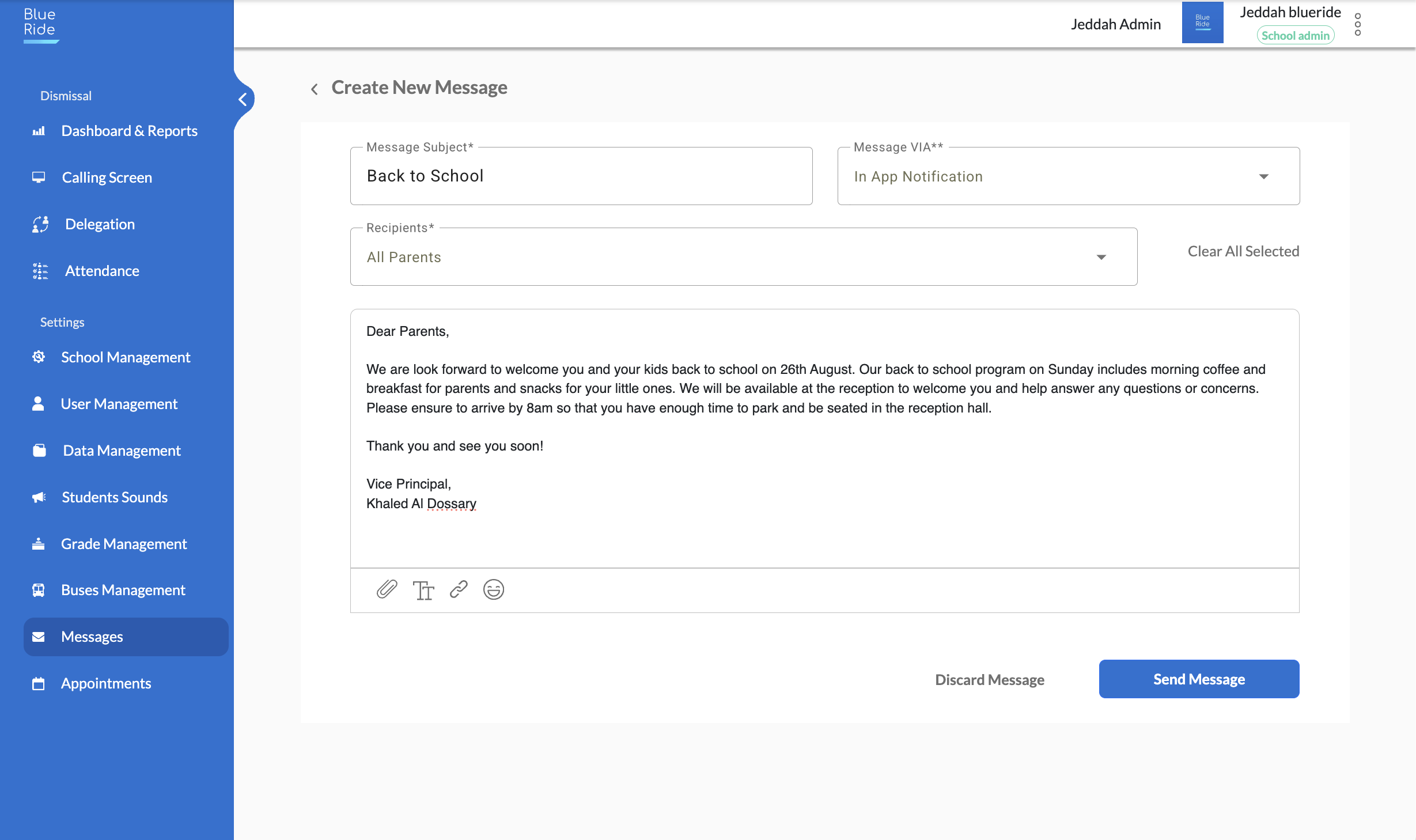
The BlueRide school-admin console composing a new message: subject “Back to School,” delivery via in-app notification, recipients set to all parents, with the full message body and a Send Message button.
Compose once, reach every parent — subject, channel, recipients and message in a single screen.
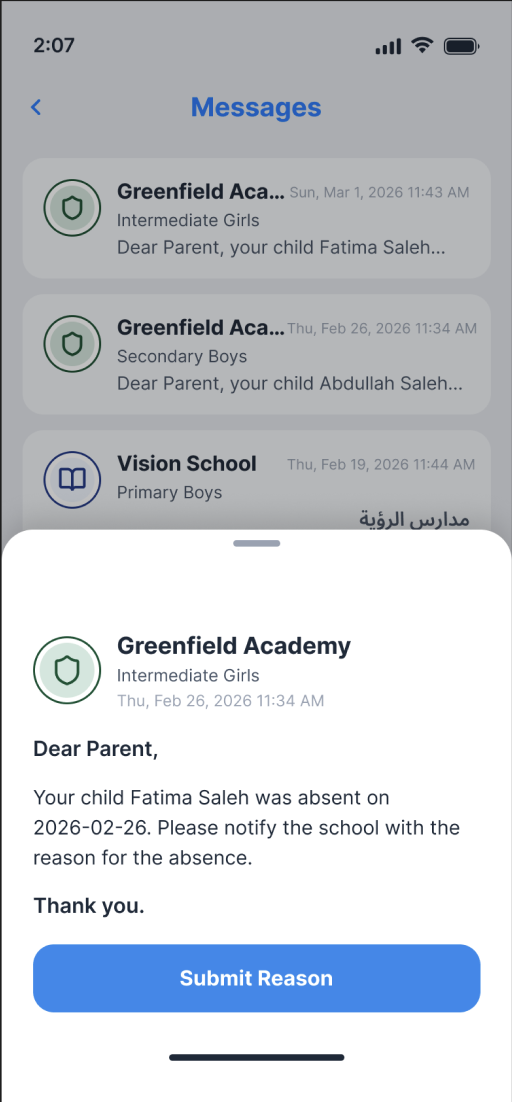
The parent's BlueRide app inbox on a phone: a list of school messages with an absence notice from Greenfield Academy opened — the child Fatima Saleh was marked absent — and a Submit Reason button.
What the parent sees — every school message in one inbox, with a one-tap reply (here, submitting an absence reason).

Two views, one system

What the office sees. What parents see.

The school office

One send, a visible trail

Send one announcement to a class or a single family, and see exactly who's read it.

Parents

One inbox, not five group chats

School announcements and a teacher's direct note land in the same app as everything else, with a reply built in.

Straight from users

Trusted by parents and school staff

  • Parent

    I thank you for this outstanding application — it is truly exceptional. I believe it would be a major improvement if it were implemented across all schools. The greatest benefit would be better organization outside schools, reducing both traffic congestion and the crowding at school gates during student pickup.

    Fahd Ali Ibrahim

    Father of two students at Al-Andalus Private Schools

  • School staff

    The BlueRide application is one of the best practical applications — it has successfully made the student dismissal process safe and efficient. Thank you for your professionalism and for always helping resolve the issues we occasionally encounter.

    Fatimah Al-Qahtani

    Elementary Section Supervisor

  • School staff

    Honestly, the app is excellent. We used it last year, and it organized the dismissal process, reduced congestion, and — most importantly — improved safety. Thank you for bringing it back. 🤍👍

    Ahmed Al-Zahrani

    Al Waqar School

  • Parent

    I was a user of the BlueRide program last year, and it made picking up my daughters from school very easy and convenient. I thank the company behind the program — it is one of the best examples of using modern technology to improve communication and coordination with students.

    A BlueRide parent

Common questions

Questions people actually ask before deciding

Is this just another group chat?

No — messages come from inside BlueRide, from the office or a teacher, to one family or one class at a time — not a crowded shared group.

How do I know if the school actually saw my reply?

Delivery and read status are visible on the sending side, so a message never quietly goes missing.

Can I reply directly to a teacher's note?

Yes — reply from the same thread, no switching to a phone call or a separate chat app.

Does this replace every WhatsApp group our school uses?

That depends on how your school currently communicates — email info@blueride.co and we'll map it out together.

One more question?

Talk to our AI assistant

Ask about anything on this page out loud, right now — instant answers, no hold music.

Talk to our AI

You'll talk to BlueRide's AI assistant — not a person. It answers questions about the platform in real time. The conversation is transcribed and saved with your contact details for our team to review.

Explore the platform

More from BlueRide

Everything your school runs through the day — in one system.

Ready to start

Send your first announcement in the demo itself.

Book a live 20-minute demo with our team, or send us your school's numbers and we'll put together a detailed quote.