BlueRide logo

Cashless Canteen

Lunch money that can't run out, and can't run wild — cashless, with a cap parents set themselves.

Cashless payment, with a spending cap parents set

Key benefits

  • Cashless payments
  • Parent spending controls
  • Allergy-safe purchases
  • No lost lunch money
  • A clear spending history

How it works

Four steps, built around how it's actually used

  1. Parent tops up and sets a cap

    From the app, a parent adds funds to their child's canteen wallet and sets how much can be spent per day.

  2. Student taps to pay

    At the register, the student taps a card or badge — no cash counted, no coins lost, no queue for change.

  3. The cap holds automatically

    Once the daily limit is reached, the wallet simply won't authorize another purchase — no overspending to catch after the fact.

  4. Everyone sees the register

    Parents see every purchase their child makes, item and time; the office sees canteen-wide sales in one report.

What actually changes

BlueRide vs. the way it's usually done

The usual way — The cash line

Kids queue with coins and notes, staff count and make change by hand, and nobody outside the till knows what was actually bought.

For the school

Sales, without counting cash

The office sees register-wide sales across every wallet and every till, without counting a single coin at the end of the day.

For staff

Tap, not tally

At the register, a card or badge tap authorizes the sale — no counting change, no manual tally at close.

For parents

A cap they set, not one they hope for

Parents top up, set a daily spending cap themselves, and see exactly what their child bought and when.

Inside the product

What it actually looks like

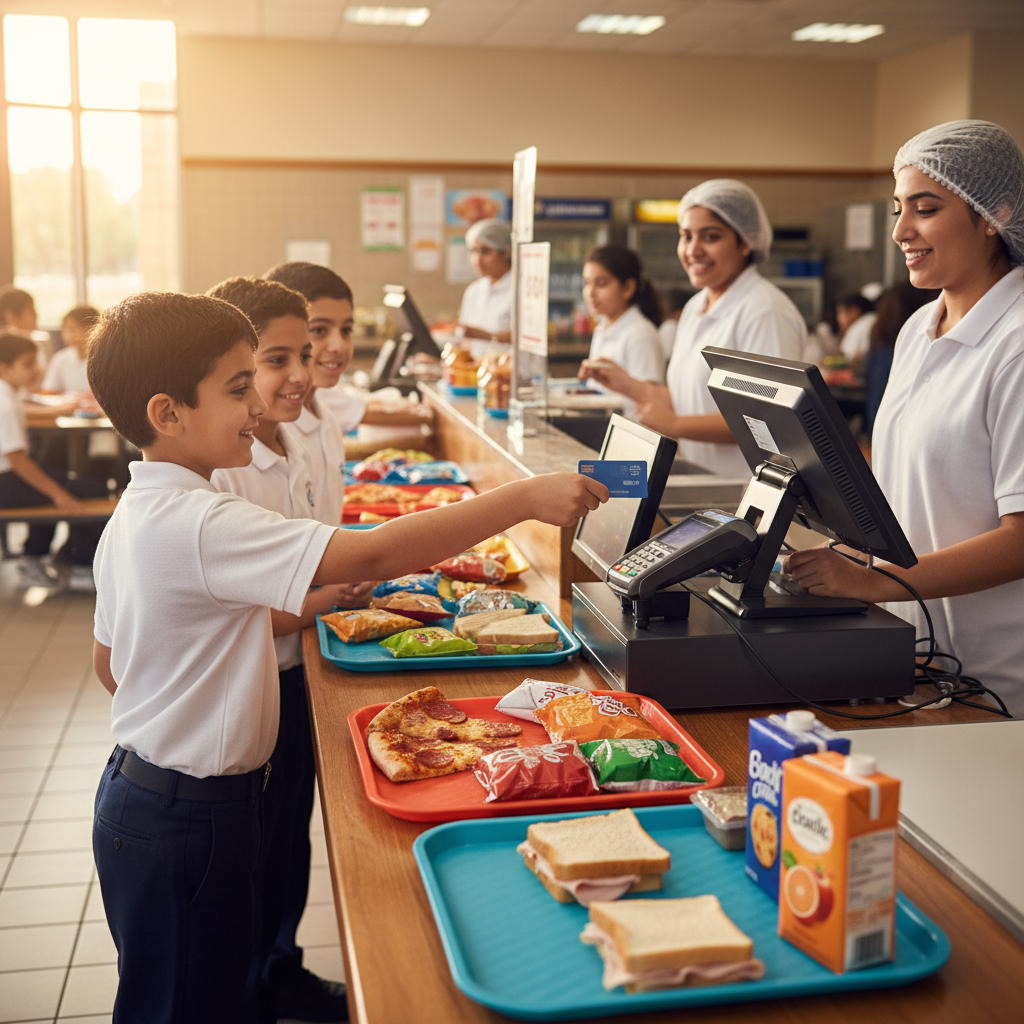
A student tapping a payment card at the canteen checkout counter, with a cashier assisting and lunch trays of sandwiches, snacks and juice on the counter.
Tap to pay at the counter — no cash counted, no queue for change.
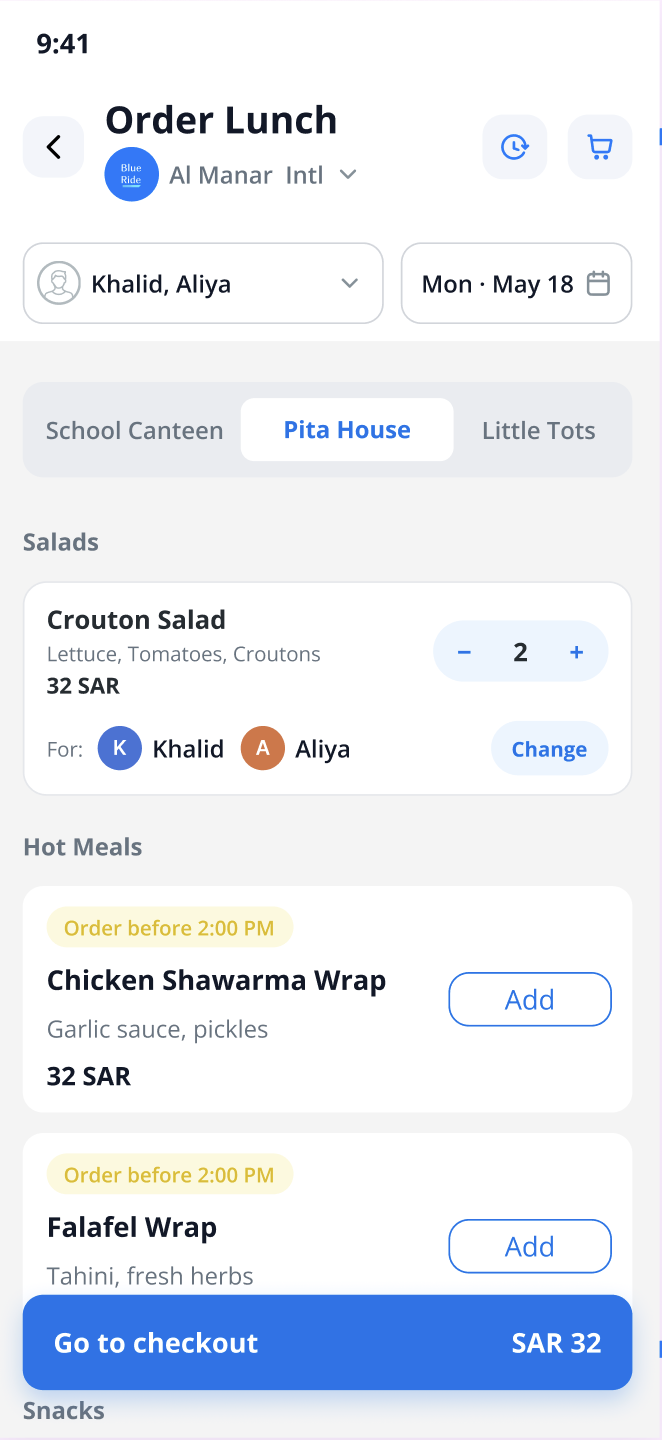
The BlueRide canteen ordering app on a parent's phone: an “Order Lunch” screen for Al Manar Intl with a child and date selector, vendor tabs (School Canteen, Pita House, Little Tots), menu items with quantities and SAR prices, and a “Go to checkout” bar.
What parents order from — pick the child, the day and the vendor, add meals, and check out.

Two views, one system

What the office sees. What parents see.

The school office

Register-wide sales, no cash to reconcile

See sales across every wallet and every till, without counting a single riyal or pound at the end of the day.

Parents

A wallet parents actually control

Top up, set the daily cap, and see exactly what their child bought and when.

Straight from users

Trusted by parents and school staff

  • Parent

    I thank you for this outstanding application — it is truly exceptional. I believe it would be a major improvement if it were implemented across all schools. The greatest benefit would be better organization outside schools, reducing both traffic congestion and the crowding at school gates during student pickup.

    Fahd Ali Ibrahim

    Father of two students at Al-Andalus Private Schools

  • School staff

    The BlueRide application is one of the best practical applications — it has successfully made the student dismissal process safe and efficient. Thank you for your professionalism and for always helping resolve the issues we occasionally encounter.

    Fatimah Al-Qahtani

    Elementary Section Supervisor

  • School staff

    Honestly, the app is excellent. We used it last year, and it organized the dismissal process, reduced congestion, and — most importantly — improved safety. Thank you for bringing it back. 🤍👍

    Ahmed Al-Zahrani

    Al Waqar School

  • Parent

    I was a user of the BlueRide program last year, and it made picking up my daughters from school very easy and convenient. I thank the company behind the program — it is one of the best examples of using modern technology to improve communication and coordination with students.

    A BlueRide parent

Common questions

Questions people actually ask before deciding

Can my child overspend at the canteen?

No — once the daily cap you set is reached, the wallet simply won't authorize another purchase.

Do I need to send cash for lunch?

No — top up your child's wallet from the app; at the register they tap a card or badge instead of paying cash.

Can I see exactly what my child bought?

Yes — every purchase is visible in the app, with the item and the time.

How does the office reconcile sales at the end of the day?

The office sees sales across every wallet and till in one view — no cash to count or reconcile by hand.

One more question?

Talk to our AI assistant

Ask about anything on this page out loud, right now — instant answers, no hold music.

Talk to our AI

You'll talk to BlueRide's AI assistant — not a person. It answers questions about the platform in real time. The conversation is transcribed and saved with your contact details for our team to review.

Explore the platform

More from BlueRide

Everything your school runs through the day — in one system.

Ready to start

See a real canteen ledger, not a mockup.

Book a live 20-minute demo with our team, or send us your school's numbers and we'll put together a detailed quote.